

Cloud-hosted Windows desktops are here to stay, it’s only the speed of their adoption and early pertinent use cases that will be debated/decided on a case-by-case basis. Just like on-prem virtual desktops, not every desktop and user will immediately be a good candidate for a cloud-hosted desktop. To best take advantage of maturing cloud technologies, organizations need to assess what desktops are best for certain users. Desktop transformations for enterprise Windows-centric organizations are nothing new, the industry has been experiencing similar challenges since the introduction of Windows XP. However, shifts to new Windows operating systems and delivery methods, such as new Windows 10 versions and cloud-hosted desktops, are happening more frequently now. With this in mind, your organization should always be ready to shift users to a new desktop at a moment’s notice.
Even if you are using a reliable, distributed physical desktop model, you can use the latest cloud technologies to ease your desktop transformations to the next OS or even to a model such as Microsoft WVD (Windows Virtual Desktop) or Amazon WorkSpaces. Thankfully, centralized cloud storage has matured and you can take advantage of major players such as Amazon, Microsoft, and Google to make even physical desktop transformations seamless.
What is Cloud Staging?
Cloud Staging is an adaptive desktop management strategy that leverages centralized cloud-based storage as a staging area to transform desktops. A Cloud Staging strategy can enable an organization to co-exist desktop types or lift and shift users to an entirely new desktop platform. Important user-centric data – such as applications, user authored data, and user profiles – are seamlessly synched and hosted on cloud storage, while users remain productive and ready to logon to their new desktop as soon as required.
You could assemble your own Cloud Staging strategy but, be warned, you’ll run into challenges (read the full blog to understand how to overcome these). Here are the most important items you’ll want to make sure you stage and some of the significant challenges you’ll face:
- Application staging: to stage user applications you’ll need a virtual or layered application delivery solution that supports cloud-hosted applications. Ideally it will support object-based storage solutions (Microsoft Azure Blob, Amazon S3, Google Cloud) so you won’t have to manage file shares and infrastructure in the cloud.
- User profile staging: User profiles should also support object-based storage and they should also support the profile format you are going to. For instance, if you have an old version of Windows 10 then you need to make sure profiles version changes to a later version will not break your profile staging plans. Also, if the platform you are sending users to uses FSLogix, you should make sure you can seamlessly hydrate profile containers. Hydrating a plain Windows FSLogix profile container with a user’s select legacy profile data make their new workspace productive at first logon.
- User authored data staging: to stage user authored data you’ll need a solution that supports a background sync to file areas where cloud storage services can be leveraged. You’ll want to make sure the solution is compatible with Microsoft OneDrive, Amazon WorkDocs, DropBox and other leading vendors.
- Monitor the user experience and progress: The last thing you want to do is hamper user productivity so you’ll want to monitor the user experience between desktop platforms so you can prove which desktop is the better quality desktop. You’ll also want to monitor the progress of data synchronization to cloud. You could use different monitoring solutions and script the completion of data synchronization to accomplish these but it would be messy at best.
The Good News
Liquidware Essentials, our complete Adaptive Workspace Management suite, puts a check in all of the Cloud Staging boxes and solves the challenges above. For customers already running the suite or those looking to leverage it, here’s how our solutions automatically perform Cloud Staging:
-
- Application staging: Liquidware FlexApp supports object-based cloud storage from all three main clouds today. You can start by hosting your on-prem virtual or physical desktop apps today and, as soon as the user logs into their desktop of the future, applications will follow them directly from the same cloud storage.
- User profile staging: Liquidware ProfileUnity seamlessly supports any Windows OS profile with smart profile harvesting, all other OS versions are then supported. FSLogix profile containers can also be hydrated with a ProfileUnity managed profile.
- User authored data staging: ProfileUnity also can be set to silently harvest user-authored data from legacy machines. This keeps users productive while staging their data on Microsoft OneDrive, Amazon WorkDocs, or DropBox for later seamless access.
- Monitor the user experience and progress: Liquidware Stratusphere UX monitors the user experience of any Windows desktop and user and, then it can be used to assess or baseline the quality of the session against the new desktop. Meanwhile, ProfileUnity audits user authored data moved to the cloud and logs the completion and readiness of each user’s account.
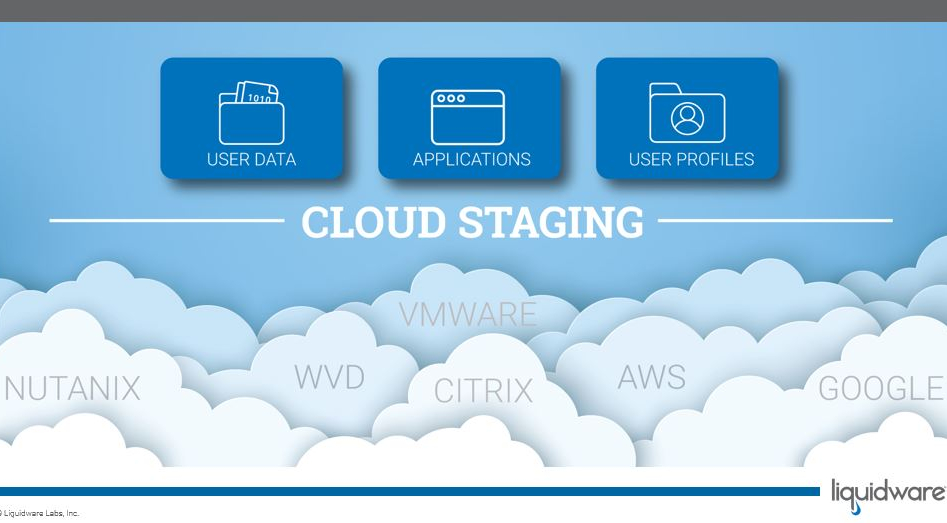

The reality of this movement to new desktops or cloud-hosted Windows desktops is that you need to have your organization ready. Even if your current desktops are performing great and you are seeing good ROI, you need to be poised to take advantage of the innovation that cloud desktops deliver. With innovative support of cloud and object-based storage embedded in Liquidware’s adaptive desktop management suite, transitions of user centric-data and apps are completely automated.
When you invoke Cloud Staging with cloud-centric storage, and best practices with Liquidware’s adaptive workspace management suite, you are ensuring your organization is ready for whatever desktop transformation lies ahead in 2020 and beyond.